Take Control of Your Family Finances – Simple, Smart & Automated
Track expenses, manage contributions, and stay on budget with our ready-to-use Family Expense Tracker template. Available in Excel, Google Sheets & Apple Numbers.
Already purchased?
The Struggle is Real...
- Struggling to track family expenses?
- Arguments over contributions & balances?
- Too many manual calculations?
...But the Solution is Simple
- Automated calculations
- Easy setup – just enter members, budgets, and deposits
- Clear summary of who owes what
- Works on Excel, Google Sheets, and Apple Numbers
Key Features
Setup Tab
Configure members, contribution %, language, and more.
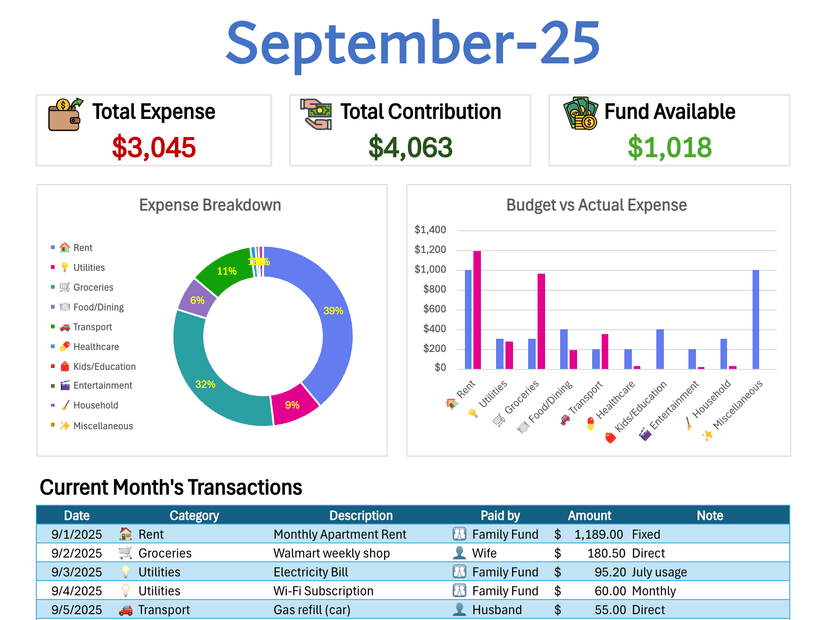
Monthly Tabs
Log expenses by category, auto-calculate shares, balances, and variances.
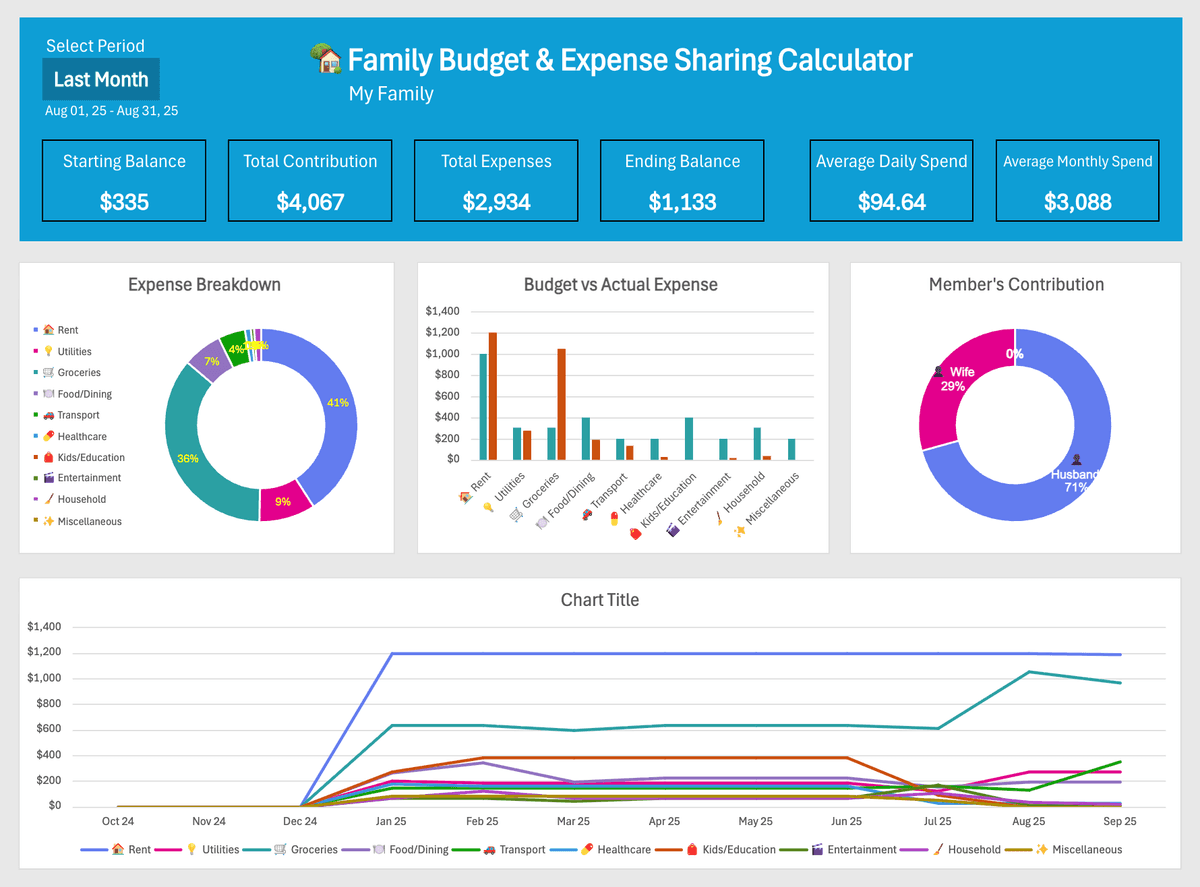
Dashboard
Get category breakdowns, trends, and member contributions.
Protected Formulas
Prevents accidental changes while keeping flexibility.
Cross-Platform
Available in Excel, Google Sheets & Numbers.
See It In Action

How to Use Your Tracker
Welcome to the Family Budget & Expense Sharing Calculator
We’re delighted to introduce you to our 🏡 Family Budget & Expense Sharing Calculator – a complete solution designed to bring clarity, fairness, and simplicity to household financial management.
Managing shared expenses can often feel overwhelming. This tool has been carefully designed to help you organize contributions, track day-to-day spending, and create realistic budgets — all in one centralized spreadsheet.
With this template, you’ll be able to:
- Record monthly and daily expenses with ease.
- Track both family fund contributions and direct payments made by individuals.
- Monitor fairness in cost-sharing by comparing contributions to agreed percentages.
- Build and follow budgets for weekly, monthly, and yearly expenses.
- Gain valuable insights with automatic dashboards, charts, and comparisons.
- (Optional) Record family income streams for a complete financial overview.
Thank you for choosing our tool. Our mission is to empower households like yours with practical, easy-to-use financial solutions. Together, let’s make your family finances more transparent, fair, and stress-free.
🛠 Setup Tab
This is the control center of your tracker. Complete this page first to ensure everything works smoothly.
Key settings include:
- Family/Flat Name & Start Date: Enter the household name and tracking start date.
- Configure Members: Add all members and their fixed contribution percentages (e.g., Husband 70%, Wife 30%).
- Contribution Check: A ✅ OK message automatically confirms that percentages total 100%.
⚠️ Do not change formula cells to ensure accuracy.

📅 Monthly Tabs
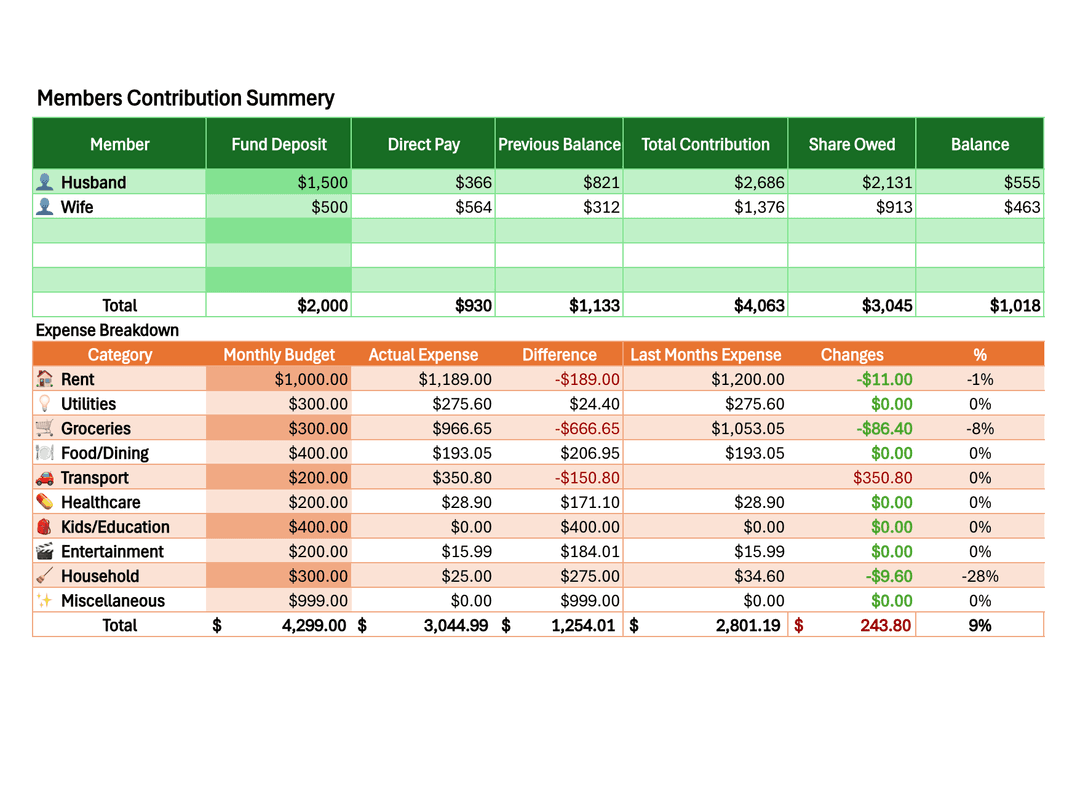
Log day-to-day expenses and see real-time summaries each month.
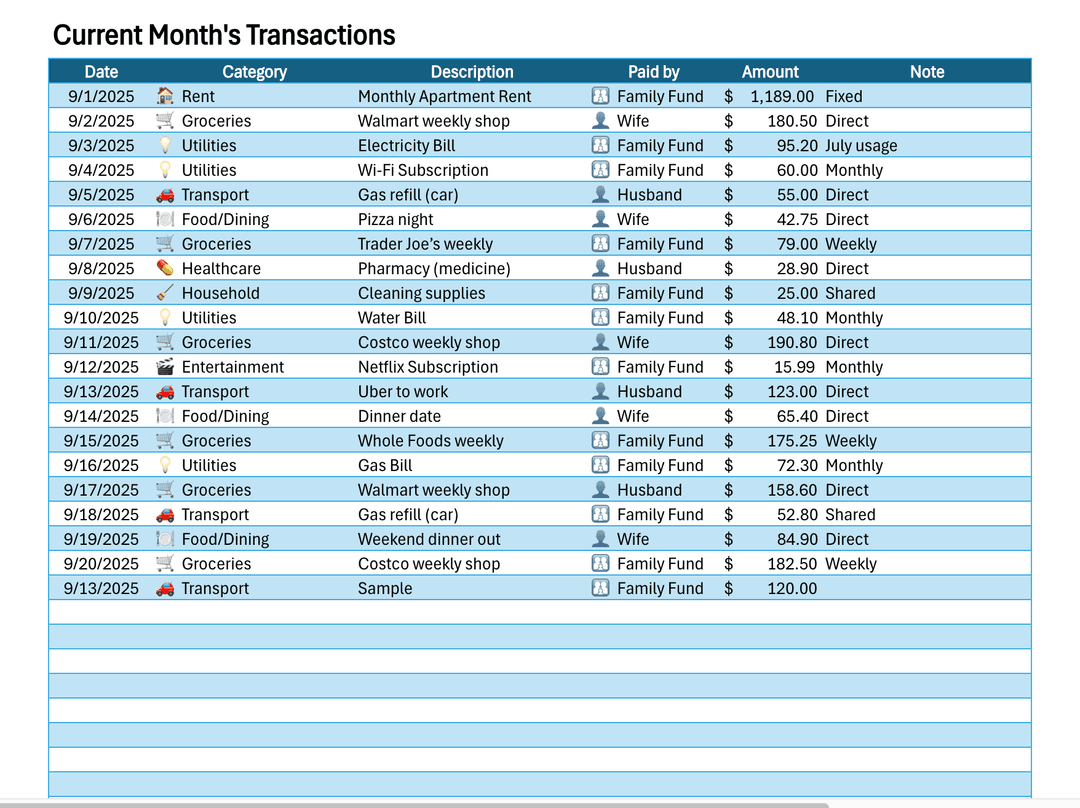
1. Log Daily Expenses
In the "Current Month's Transactions" table, log every expense with its date, category, payer, and amount.
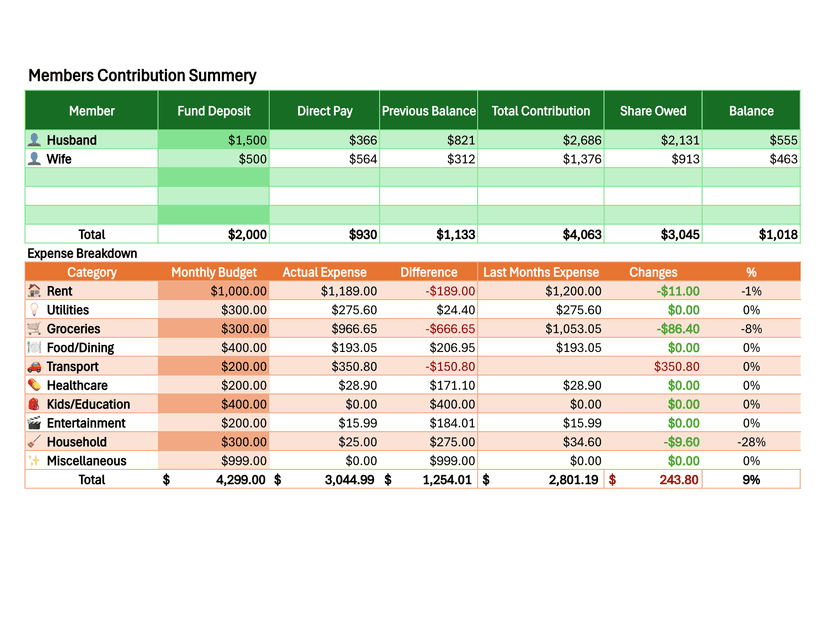
2. See Automated Summaries
The sheet instantly calculates each member’s contribution summary and the expense breakdown. Just add your fund deposits and budget, and the rest is automatic.
Perfect For...
- Families sharing household expenses
- Couples managing a shared budget
- Roommates splitting rent and utilities
- Anyone wanting a simple, automated household budget tracker
Social Proof
“This template finally ended our monthly ‘who owes who’ arguments. Worth every penny!”
“So much easier than any app I've tried. Simple, effective, and I can tweak it how I like.”
Frequently Asked Questions
Q: Do I need advanced Excel/Sheets skills?
A: No, it's beginner-friendly with built-in formulas.
Q: Can I customize categories?
A: Yes, categories are fully editable.
Q: What is the refund policy?
A: Because this is a digital download, all sales are final. No refunds, exchanges, or cancellations will be accepted once the product has been delivered.
Important Information
This template is for informational and personal use only. We cannot provide financial, tax, or legal advice. Please consult a licensed financial advisor for any major financial decisions. We will not be held responsible for any costs, losses, damages, or issues that may result from the use of this spreadsheet.
This template is copyrighted by ViveScript Solutions and is for personal use only. Reselling, sharing, reproducing, or distributing this product, either in part or in full, with or without modifications, is strictly prohibited.
We are not affiliated with Microsoft or Google. This template is designed to work on both Excel (desktop and web version) and Google Sheets (online), but some features may display slightly differently depending on the platform.
Need Help?
If you have any questions or need support, please don't hesitate to reach out to us.
info@vivescriptsolutions.comReady to Master Your Family Finances?
Get your copy today and enjoy stress-free expense tracking.